Could AI Build Your Next Interactive Seating Plan?
From an AI Prompt to a Live Seat-Booking System
Creating an interactive seating plan has traditionally been a slow and specialised task.
A theatre, event organiser or venue owner may already have a printed seating chart, PDF plan or venue schematic, but turning that information into a working online seat-booking system can take many hours.
Every seat must be positioned.
Rows must be aligned.
Tables, aisles, stages, labels and accessibility areas must be represented.
Seat numbers must be checked.
Finally, the completed layout must be connected to a ticketing system so customers can select and purchase the correct seats.
But there may now be another way to approach the repetitive part of this work.
A Simple AI Experiment
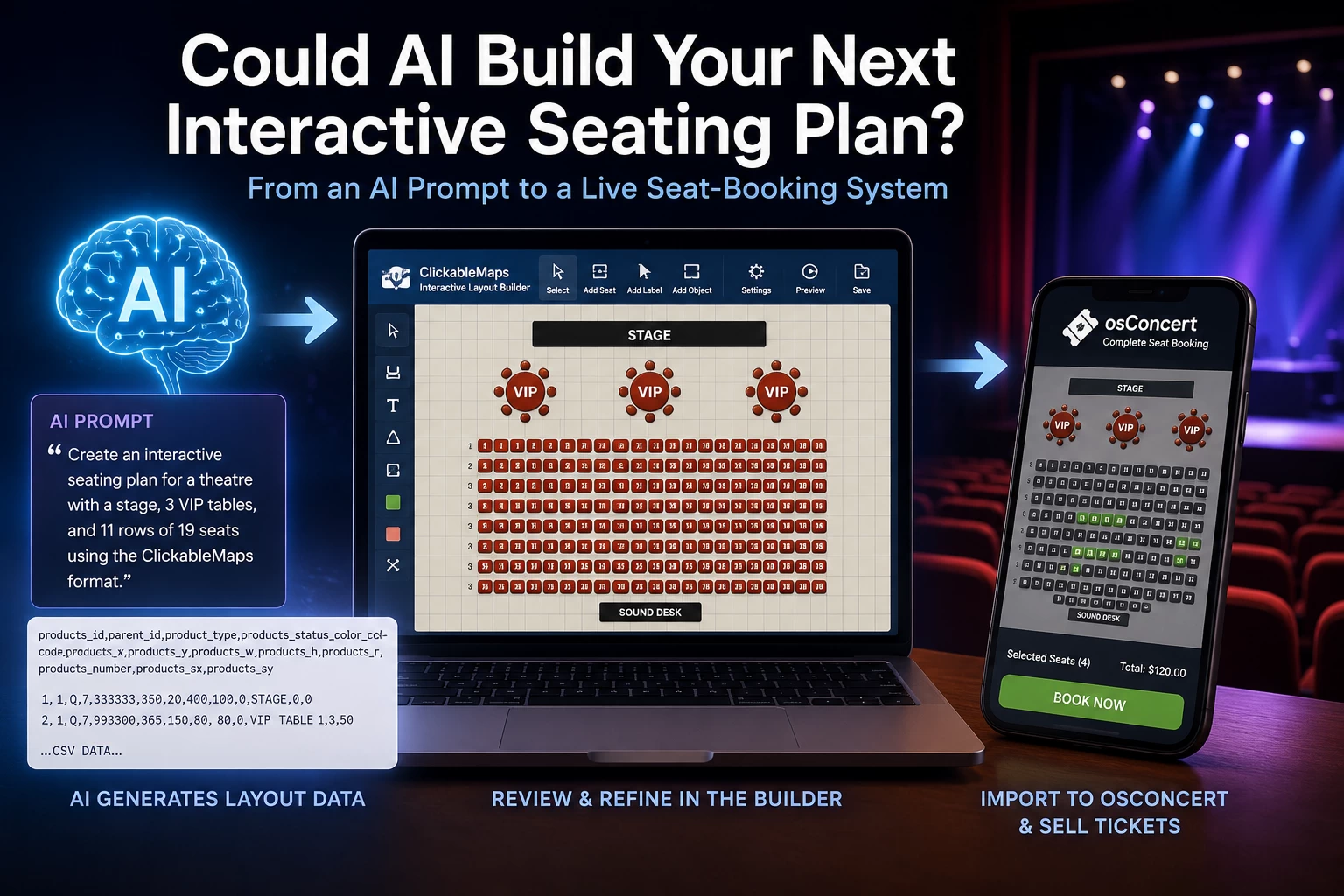
While developing the ClickableMaps Interactive Layout Builder, we tested a simple idea.
Could an AI assistant generate a complete venue layout in the correct CSV format for the builder?
We asked AI to create a larger symmetrical venue plan inside the standard ClickableMaps 1100-pixel workspace.
The requested layout included:
- a centred stage;
- three VIP tables;
- six seats around each table;
- eleven rows of theatre seating;
- nineteen seats in each row;
- colour-coded areas;
- rounded and circular shapes;
- a sound desk;
- systematically calculated positions.
Within a very short time, the AI produced an import-ready CSV containing more than 200 positioned objects.
The CSV was imported into the ClickableMaps Interactive Layout Builder and displayed as a complete venue layout.
The same structured layout format could then be transferred into osConcert, where reserved-seat objects can become selectable products in a live online booking system.
A layout that would have required considerable repetitive work to construct manually was generated in minutes.
The Experiment Has Now Gone Further
There was an important limitation to that first test.
The AI was given information about how the ClickableMaps CSV worked.
That raises an obvious question:
Could an AI that knows nothing about ClickableMaps discover the technical rules for itself?
To explore this, we have now published the ClickableMaps AI Layout CSV Specification.
The specification documents the layout format for humans, developers and AI systems. It defines:
- the 1100-pixel master workspace;
- required CSV columns;
- P selectable-seat objects;
- L text and label objects;
- Q visual prop objects;
- osConcert-compatible status values;
- X and Y positioning;
- width and height;
- rotation;
- supported colours;
- shape encoding;
- generation rules;
- validation requirements;
- human-review requirements.
The objective is to make the format understandable without privately explaining it to the AI first.
This creates a much more interesting experiment.
A user should eventually be able to provide a venue schematic to their preferred AI assistant, direct it to the published ClickableMaps specification and ask it to prepare an import-ready first draft.
Have a Venue Plan?
Imagine an entrepreneur, theatre company or event organiser preparing an event at an existing venue.
They have access to an official seating chart but no interactive booking plan.
Instead of manually positioning hundreds of seats, they could ask their preferred AI assistant:
Read the ClickableMaps AI Layout CSV Specification and use this venue schematic to create an import-ready ClickableMaps seating plan. Reproduce the stage, seating sections, rows, aisles, labels and seat numbers as accurately as the supplied information allows.
The AI could potentially calculate:
- seat positions;
- row structures;
- seat numbers;
- object dimensions;
- section colours;
- stages and visual props;
- labels;
- object shapes;
- import-ready CSV data.
The generated CSV could then be opened in the ClickableMaps Layout Builder.
The user can inspect it visually, move seats, adjust dimensions, correct numbering, change colours and refine the layout.
Once verified, an osConcert-compatible seating layout can be imported into osConcert and configured as a bookable event.
The workflow becomes:
Venue plan or seating schematic
↓
AI reads the ClickableMaps specification
↓
AI generates a first-draft CSV
↓
ClickableMaps visual review and correction
↓
Import into osConcert
↓
Live interactive seat booking
The AI Does Not Replace the Editor
This does not mean AI can automatically produce a perfect operational seating plan for every venue.
A real venue may contain:
- irregular or curved rows;
- restricted-view seats;
- multiple levels;
- balconies;
- wheelchair and accessibility areas;
- unusual numbering systems;
- pillars and structural obstructions;
- emergency exits;
- venue-specific operational and safety requirements.
An AI may also misunderstand a schematic or make incorrect assumptions where information is missing.
The final plan therefore needs to be checked by someone who understands the venue.
But the AI does not need to produce the final approved plan to be useful.
It needs to produce a strong first draft.
Instead of positioning hundreds of objects individually, the user can import generated data, inspect the resulting layout and make corrections visually.
AI performs repetitive calculations. Humans remain responsible for accuracy and approval.
Why Structured Layout Data Matters
The important part of this process is not simply the drawing.
It is the structured data behind it.
The ClickableMaps CSV format can describe information including:
- object type;
- visible seat number or label;
- colour;
- position;
- width;
- height;
- rotation;
- shape;
- osConcert-compatible object status.
An AI assistant is therefore not being asked merely to draw a picture.
It is being asked to produce a structured description of an interactive layout according to a documented specification.
That distinction matters.
A picture can be viewed.
Structured layout data can be imported, inspected, corrected, transformed and used by another application.
From Structured Knowledge to Useful Work
This experiment is also about something larger than seat plans.
ClickableMaps is published using the CyberGord Web Engine and its Structured Knowledge system.
Normally we think about structured website information as a way of helping search engines or AI systems understand what a page, product or organisation represents.
But what happens if that knowledge becomes detailed enough to explain how to perform a task?
The ClickableMaps AI Layout CSV Specification is an experiment in doing exactly that.
Instead of merely telling an AI:
“ClickableMaps is a layout builder.”
we can describe the actual technical language of the application:
“These are the objects. These are the fields. These are the permitted values. These are the coordinate rules. These are the validation requirements. This is how you generate a compatible layout.”
If an unfamiliar AI can read that published knowledge and subsequently create data that works with the application, Structured Knowledge has moved beyond description.
It has helped an AI perform useful work.
More Than Theatre Seating
The underlying concept is not limited to theatres.
Structured interactive layouts could potentially represent:
- conference halls;
- cinemas;
- dinner events;
- exhibitions;
- trade shows;
- museums;
- festivals;
- parking facilities;
- marinas;
- campsites;
- classrooms;
- temporary event spaces;
- other selectable physical locations.
Not every application requires ticketing.
ClickableMaps can remain the visual layout environment, while different applications can eventually use the structured objects for different purposes.
For reserved seating, its connection with osConcert provides an immediate practical use.
Where osConcert Fits
osConcert is an independent event ticketing and seat-booking system.
It supports functions including:
- reserved seating;
- general admission;
- event dates and times;
- ticket types and pricing;
- seat availability;
- customer orders;
- online payments;
- electronic tickets;
- box-office sales.
ClickableMaps and osConcert therefore perform different jobs.
ClickableMaps creates and refines the structured layout.
osConcert turns an approved seating layout into a working reservation and ticketing system.
Together they provide a route from a venue schematic to online reserved-seat sales.
An Opportunity for Independent Operators and Entrepreneurs
This may be particularly interesting for independent venues, event organisers and entrepreneurs.
A smaller operator may not need an enormous enterprise ticketing platform.
They may simply have a venue, an event and a seating plan—and need a practical way to turn those ingredients into a working reservation system.
AI could reduce some of the repetitive setup work.
An entrepreneur could help a theatre, attraction, exhibition or event organiser by:
- interpreting the venue requirements;
- preparing or generating the initial layout;
- checking and correcting the layout;
- configuring ticket sales;
- connecting payments;
- launching the booking system;
- supporting the organiser.
AI does not remove the need for somebody who understands the project.
It may make that person considerably more productive.
Have a Venue Plan? Turn It Into a Booking System.
That may ultimately be the simplest way to explain what we are exploring.
Start with the venue.
Use AI where it saves repetitive work.
Use ClickableMaps to see and correct the result.
Use osConcert when those objects need to become real bookable seats.
The future we are exploring is not completely automatic.
It is assisted:
AI prepares.
ClickableMaps visualises.
Humans verify.
osConcert books.
And the next experiment is straightforward:
Give an AI that has never used ClickableMaps a real venue schematic and the published ClickableMaps AI Layout CSV Specification—and see if it can build the first draft.