
How to use Global Expiry with Holding Categories and Sub-Categories?
Unix Timestamps
Using Global Event Expiry with Holding Categories and Sub-Categories
The Global Event Expiry feature is designed to automatically enable or disable event categories based on the stored event date and time. This is particularly useful for more advanced event structures where a parent category contains multiple performances or sessions.
Example Event Structure
A common setup might look like this:
Ice Concert Sessions (Holding Category)
│
├── 10:00 AM Session
├── 12:00 PM Session
├── 2:00 PM Session
├── 4:00 PM Session
└── 8:00 PM Session
Each session category contains the ticket products for that performance.
Important: Date and Time Order
When using Global Event Expiry (Expire Categories), osConcert uses the Unix timestamp stored in the categories table to determine when a category should expire.
If you want both the session categories and the holding category to expire automatically, the holding category must have a later date and time than any of its child categories.
Example
CategoryDateTime10:00 AM Session01-08-2026100012:00 PM Session01-08-202612002:00 PM Session01-08-202614004:00 PM Session01-08-202616008:00 PM Session01-08-20262000Ice Concert Sessions (Parent)01-08-20262359
In this example, all session categories will expire first, followed by the holding category at the end of the day.
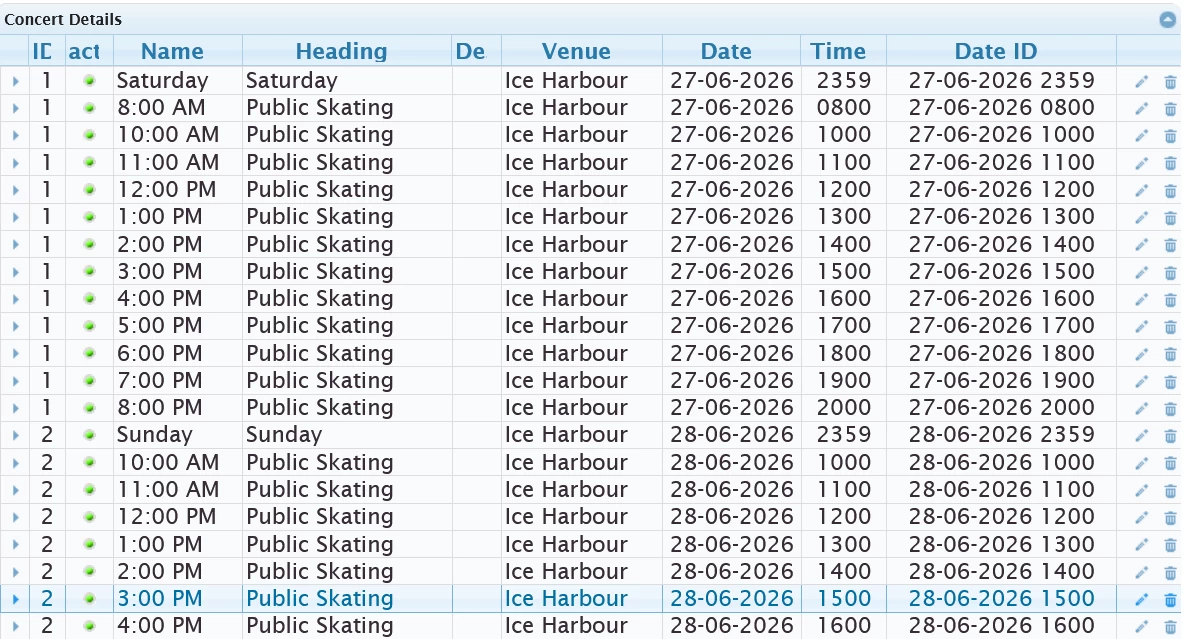
Sorting Categories
You are not required to sort categories using Unix timestamps.
osConcert also supports manual category sorting using the standard sort order fields.
However, if you are using the Global Event Expiry feature, it is important that your category dates and times are entered correctly so that expiry occurs in the expected order.
Simpler Event Setups
Most event setups do not require this level of configuration.
For a single performance or a simple General Admission event, categories can usually be enabled or disabled manually using the Active setting in Concert Details.
Manual Category Control
Categories are controlled using the following status values:
categories_status = 1  (Active)
categories_status = 0  (Inactive)
The Global Event Expiry feature automatically updates these values when expiry conditions are met.
You can also enable or disable categories manually at any time using the Active column in the Concert Details jqGrid.
Recommended Usage
Use Global Event Expiry when:
- Running multiple performances on the same day.
- Creating advanced General Admission event structures.
- Managing session-based events that should automatically disappear after a specific time.
- Building parent/child category structures where automatic expiry is preferred over manual administration.
For basic events, manual activation and deactivation is often the simplest approach.